The Product Brain
How I stopped deciding on vibes and started showing up with receipts. No code required.
Written April 2026, reviewed and de-branded September 2026
This started life as an internal enablement page for my team, which is why it still reads a little like I am standing at a whiteboard talking to coworkers. The four-layer system is what I actually built and it still works. I have since cut a fair amount of the scaffolding around it, and where that changes the advice I have said so inline rather than quietly editing the page.
I do product management in a heavily regulated industry. Complex compliance requirements, Salesforce-heavy workflows, data integrity across a dozen systems. That is a lot of context to carry around in your head every day, and the carrying is not the job. Organizing it is what matters most.
This isn't a playbook. It's everything I'd walk you through if you sat down next to me and said "okay, show me."
1. Watch These Two Videos and Follow Along
If you're motivated and ready to go, this is all you need.
These two videos break it down better than I can in text. Don't just watch them. Pause, follow along, do what they do. By the end you'll have a working setup and you'll be ready to do everything I talk about below.
Seriously. If you do nothing else on this page, do this.
Paul J Lipsky
Great foundation content for Claude Cowork. Covers the basics of getting set up, the mental model, and how to start building with it.
Ben AI
Goes deeper. Fills in the gaps from the first video and shows you patterns most people miss. This is where things start clicking.
How I AI
Great channel overall. The episode on homeschooling with AI is especially good if you want to see how far this stuff can go outside of work.
Not Sold Yet? Here's What It Actually Does.
If you're still on the fence about whether this is worth the time, these are real results from my first few weeks.
Three weeks of research in thirty minutes
Pre-discovery research that used to take weeks of digging through Confluence, Slack history, and Gong calls. Now I point it at the sources, the folder context handles the framing, and I get a structured brief back in minutes.
1:1 prep, 80% done before I touch it
Before my weekly manager sync, it pulls what shipped, what's blocked, decisions needed, and what shifted since last week. I just review and add the stuff that needs a human take.
Standup in 30 seconds
Runs every weekday morning. Pulls from Jira and recent Slack activity, formats to match our team's standup style. I review and post. That's it.
Built this website in an evening
A coworker told me it's faster to build a website with Claude than to make a PowerPoint. He was right. This entire site was built in one sitting, and it looks cooler too.
You don't need a six-skill pipeline to get results like these. Start with the videos above, then pick one real task from your actual work and try it.
2. The Folder System
Claude doesn't read your mind. It reads your folder.
Most people hit one of two problems with AI. Either they give it zero context and get back something generic and useless, or they dump 50 pages of documents into a conversation and the answers wander all over the place.
The real question isn't "how do I give AI more context?" It's "how do I give it the right context, automatically, every time?"
That's what the folder system solves.
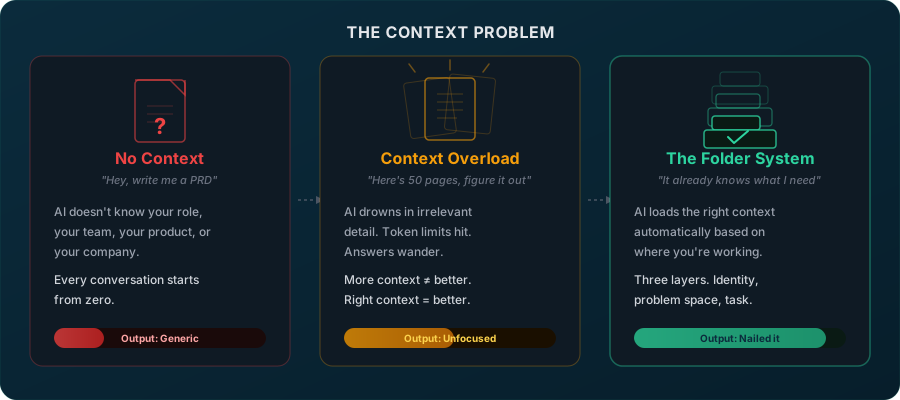
Three layers. Each one loads automatically based on where you're working.
Layer 1: Who you are
Your role, your team, how you work, what tools you use. Loads every single session. The AI knows you the way a good coworker does after three months on the job.
Layer 2: The problem space
The initiative you're working in right now. What's been decided, what's still open, who the stakeholders are, and whether it maps to a company objective this quarter. If it doesn't? You can skip pages of irrelevant context and the answers get sharper, faster, and cheaper on tokens.
Layer 3: The task
The thing you're actually doing right now. A draft, a research question, a meeting prep doc. Layers 1 and 2 are already loaded. You just say "write the epic" and it already knows the initiative, the format, and your voice.
This is especially powerful when you work across multiple teams or problem spaces. There might be tons of technical deep-dive details or tons of history in your workspace. But for a specific conversation, all you really need is the mid-level problem and how (or if) it aligns to a company objective. The folder system lets the AI navigate to the right depth instead of drowning in everything.
Real example: We had a recurring sync bug hitting customer orgs for seven months. The signal was scattered across Jira tickets, Slack threads, a Gong call, and a meeting transcript. I pointed Claude at all of it. Because the folder system already had context about our Salesforce sync architecture and team structure, it came back with root cause, affected customer patterns, engineering options, and the right questions to ask.
I was able to ask those questions on a live CS-product-enablement call the same day, ping the engineer who knew the area, and ship his fix (which was also Claude-generated code) within one hour. What used to take half a day just to research and guess based on vibes.
A colleague's reaction: "Would that be something you could build as a skill?" My answer: "It IS a skill. Or, three sets of skills I built based on how I like to work."
Going Deeper: The PM Brain Architecture
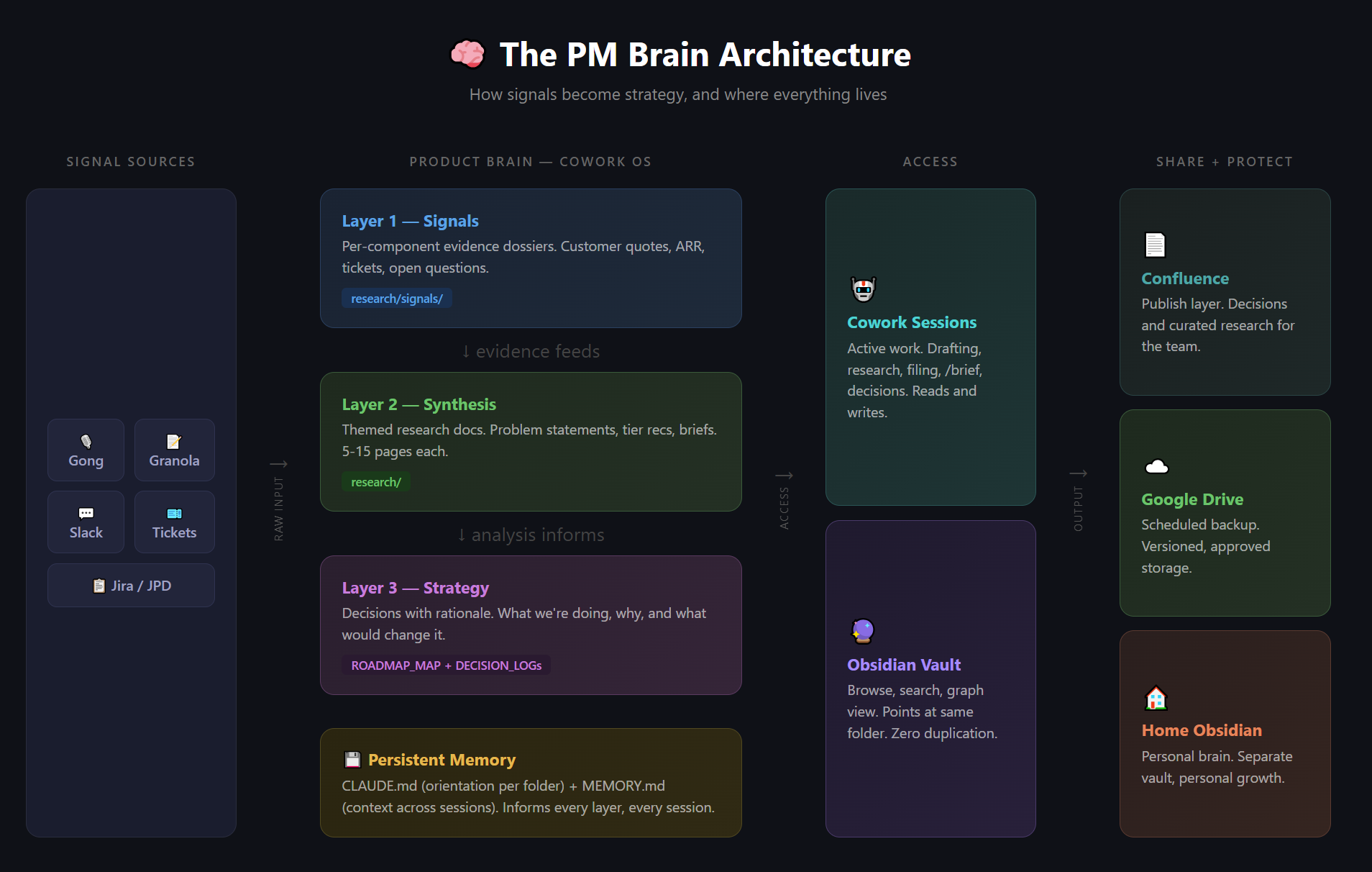
The three-layer folder system above is the starting point. For product management specifically, I evolved it into a four-layer architecture that maps how raw signal becomes strategy. The short version of why it exists: I went from being a vibe PM to a receipts PM, and this architecture is what made the switch possible.
From Vibes to Receipts
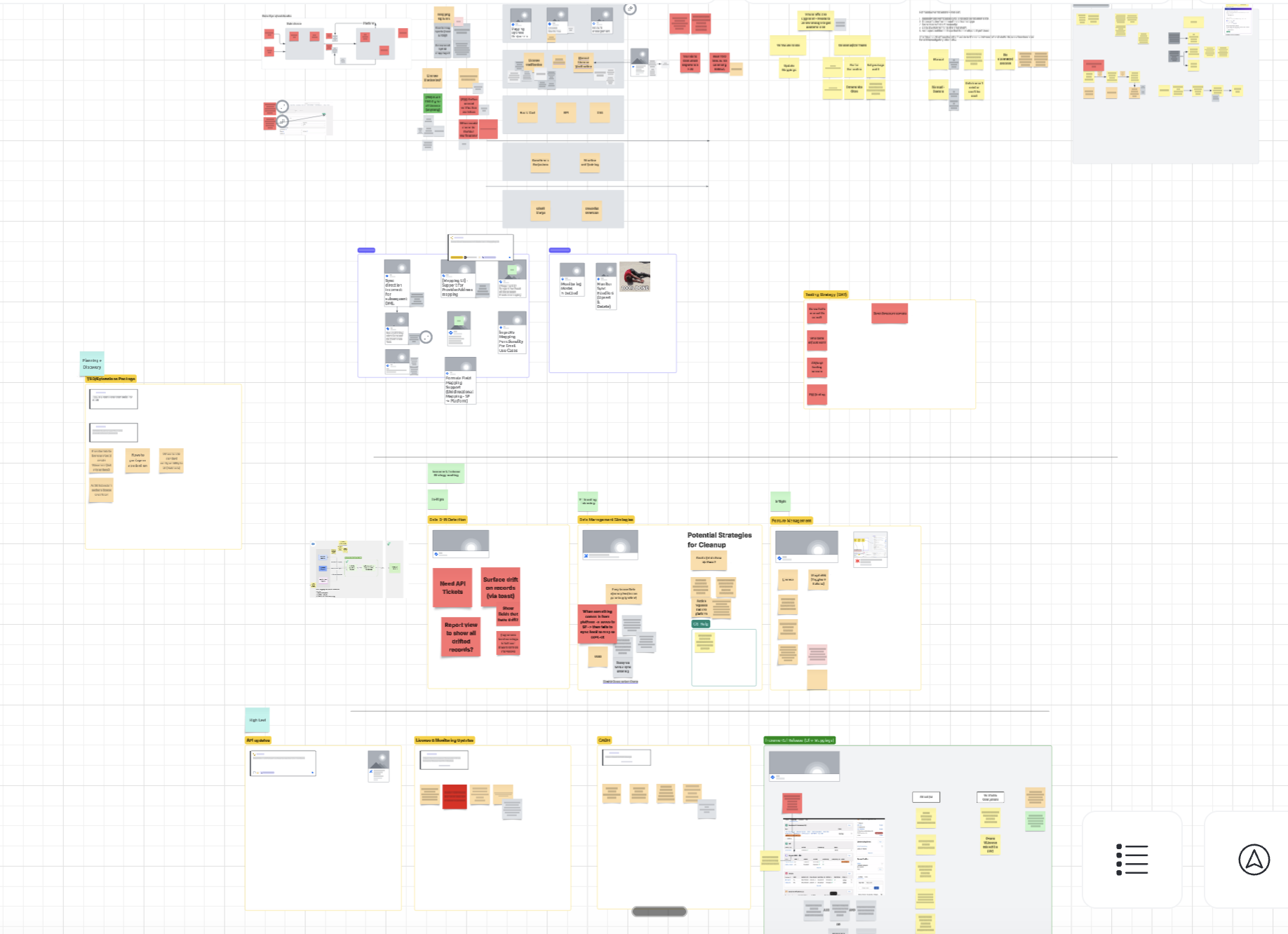
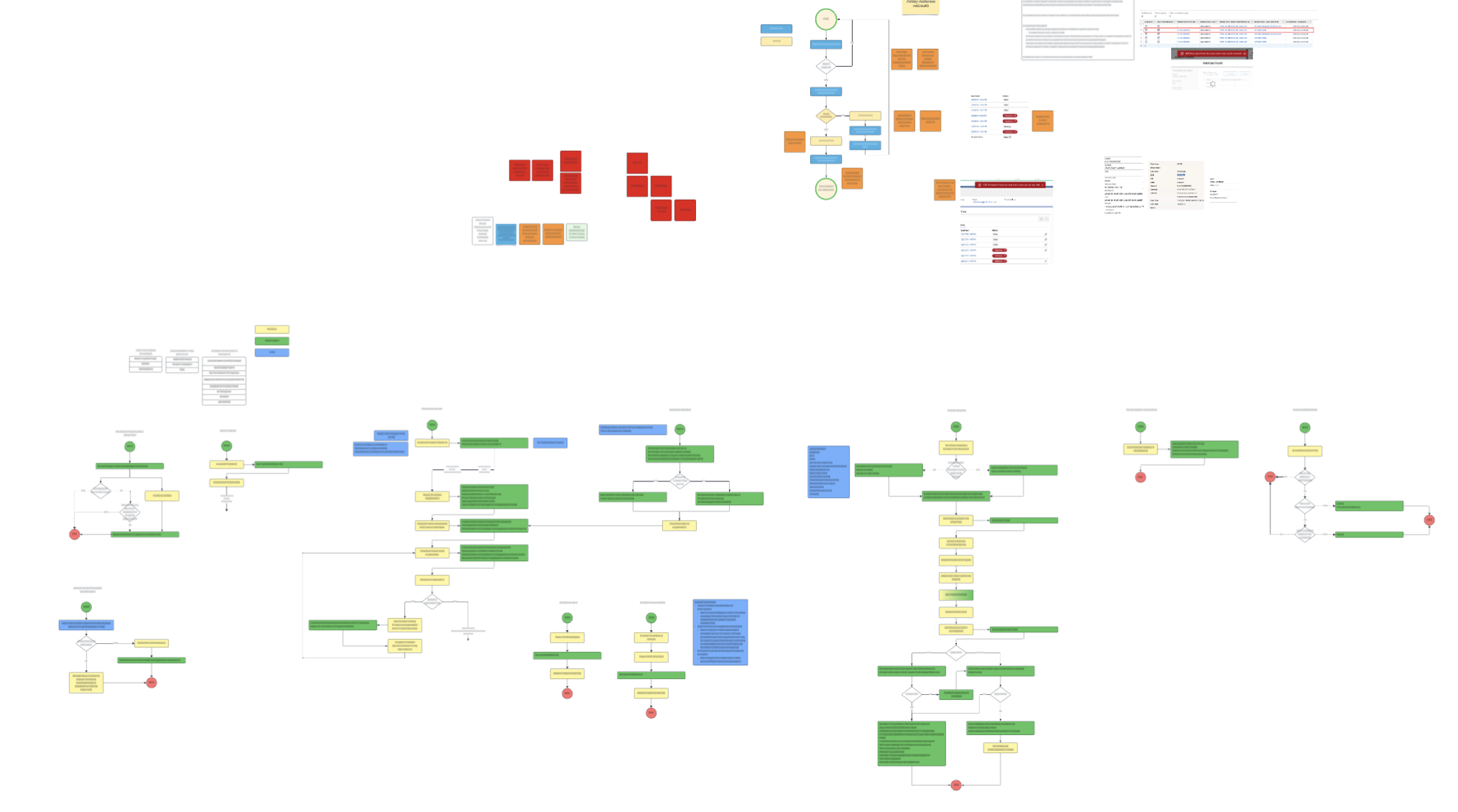
Before this existed, my day looked like ten tabs and a prayer. One tab for customer research. One for the strategic debate partner. One for the big rocks. One for the Slack thread I was about to lose. One for the doc I was trying to write. And four others I'd open and forget. I'd manually copy everything into one place, lose the higher-level objective somewhere around the third paste, and end up throwing a dart at the wall sooner than I wanted to. "I think this is one of the bigger problems. Let's go work on it for three months."
My short-term working memory is exceptionally bad, which is why I used to live in Lucid and Miro. My favorite thing in product management was being in a room with smart people, an architect, and a whiteboard, hashing out the customer's actual problem. The whiteboard was my second brain. Now the PM Brain Architecture is.
Today I can multithread. Customer research, mockups, expert outreach, architecture gut-checks, and synthesis all happen at the same time. Things that used to eat a week now eat half an afternoon. More importantly, I don't show up to leadership with vibes anymore. I show up with receipts. A book of signals, a synthesis document that sits on top of those signals, and a one-page strategy brief that ties to the company's actual objectives. The arguments are about evidence now, not opinion.

The Four Layers
Each layer feeds the one above. Signals are the receipts. Synthesis is the analysis. Strategy is the decision. Persistent memory keeps the whole thing coherent across sessions and folders.
Signals
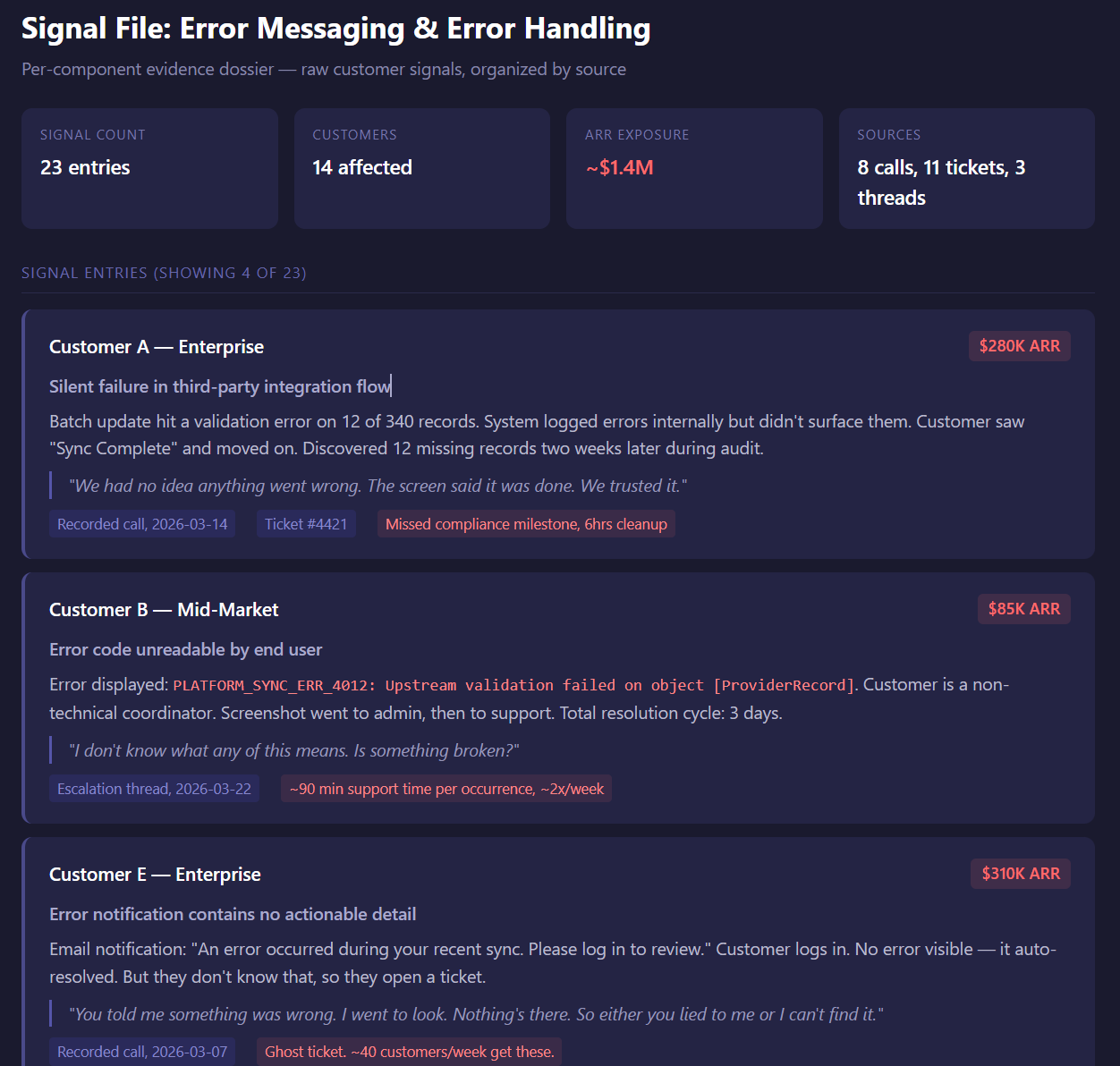
Per-component evidence dossiers. Customer quotes, ARR impact, support tickets, the link back to the source for every claim. Raw material, organized by what it's about, not when it arrived. This is where the receipts live.
Synthesis
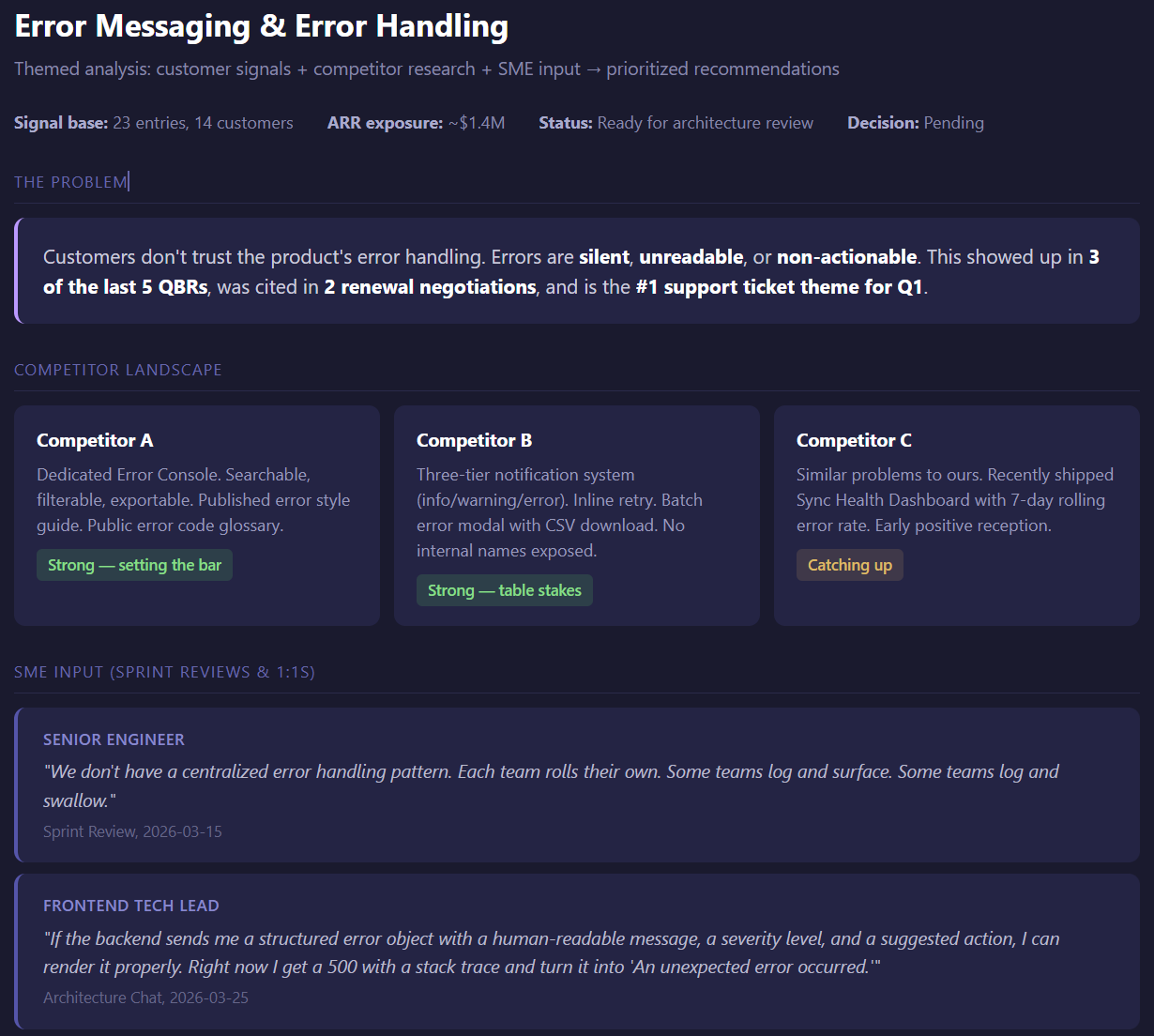
Themed research docs. After looking at the signals and grouping the patterns, this is where I add competitor research, market context, and my own expertise. The output is two or three well-formed problem statements with the highest-value actions laid out as options. 5-15 pages each. Evidence becomes analysis.
Strategy
Why we're doing this and not the other thing. A one to two page executive brief plus a three to four page presentation, tied to the company's big rocks. Includes a "what would change this" section so future-me can audit the decision instead of guessing why past-me made it. This is what I take to the head of product.
Persistent Memory
CLAUDE.md and MEMORY.md. This layer touches everything because every session has to start oriented and end with the context preserved. More on these two files in a moment.
Signal sources (Gong, meeting notes, Slack, Jira, support tickets, help docs) feed into Layer 1. From there, evidence flows up through synthesis into strategy. Outputs get published to Confluence and backed up to Google Drive. Active work happens in Cowork sessions. Obsidian sits over the same folder for browsing and graph view, with zero duplication.
A Real Example
Take error messaging between Salesforce and a third-party platform. Layer 1 captures every piece of evidence: which customer, what the issue was, the business impact, and a link back to the source. Support tickets, Gong calls, Slack threads, the works. Within ten seconds I can kick off five searches in parallel and bring back the top trends in priority order, ranked by how many customers reported them in the last 90 days.
One trend was that errors were happening but the Salesforce flow wasn't surfacing them. Customers thought everything was fine when it wasn't. Another was that errors were displayed but the codes were hard to read. Same category of problem, very different urgency, very different fix. With the receipts in hand I could go to leadership and say "we need to surface messages where customers actually are when they take the action," and back it with the count, the customer ARR exposure, and the source for every claim.
That used to be a week of guessing. Now it's a morning of confirming.
The Receipts Compound
The unlock isn't only for me. I had an initiative I'd intentionally sliced thin into four epics, expecting roughly a month of work. One of our developers grabbed the signals doc I'd linked to the epic, a Confluence page with every acceptance criterion and pain point in priority order, and imported the whole context into his own Claude session. He shipped epics one, two, and four in two days. Day three is tomorrow. What I thought was a month is closing in three days. The developer didn't get faster. The context did.
CLAUDE.md and MEMORY.md
These are the two files that make persistent memory actually persistent. They sound similar and they do very different jobs.
CLAUDE.md is the orientation doc
It tells the AI who I am, what I do, what tools I use, and how I like things. It's per folder. It loads every time I open that folder. It rarely changes. Think of it as the new-hire onboarding doc for an infinitely fast coworker.
MEMORY.md is the context bridge
It's where I save the things I want to remember between sessions. Decisions in flight, parked ideas, the current state of whatever I'm working on. It changes constantly. It's how a session that ends Monday picks up coherently on Wednesday.
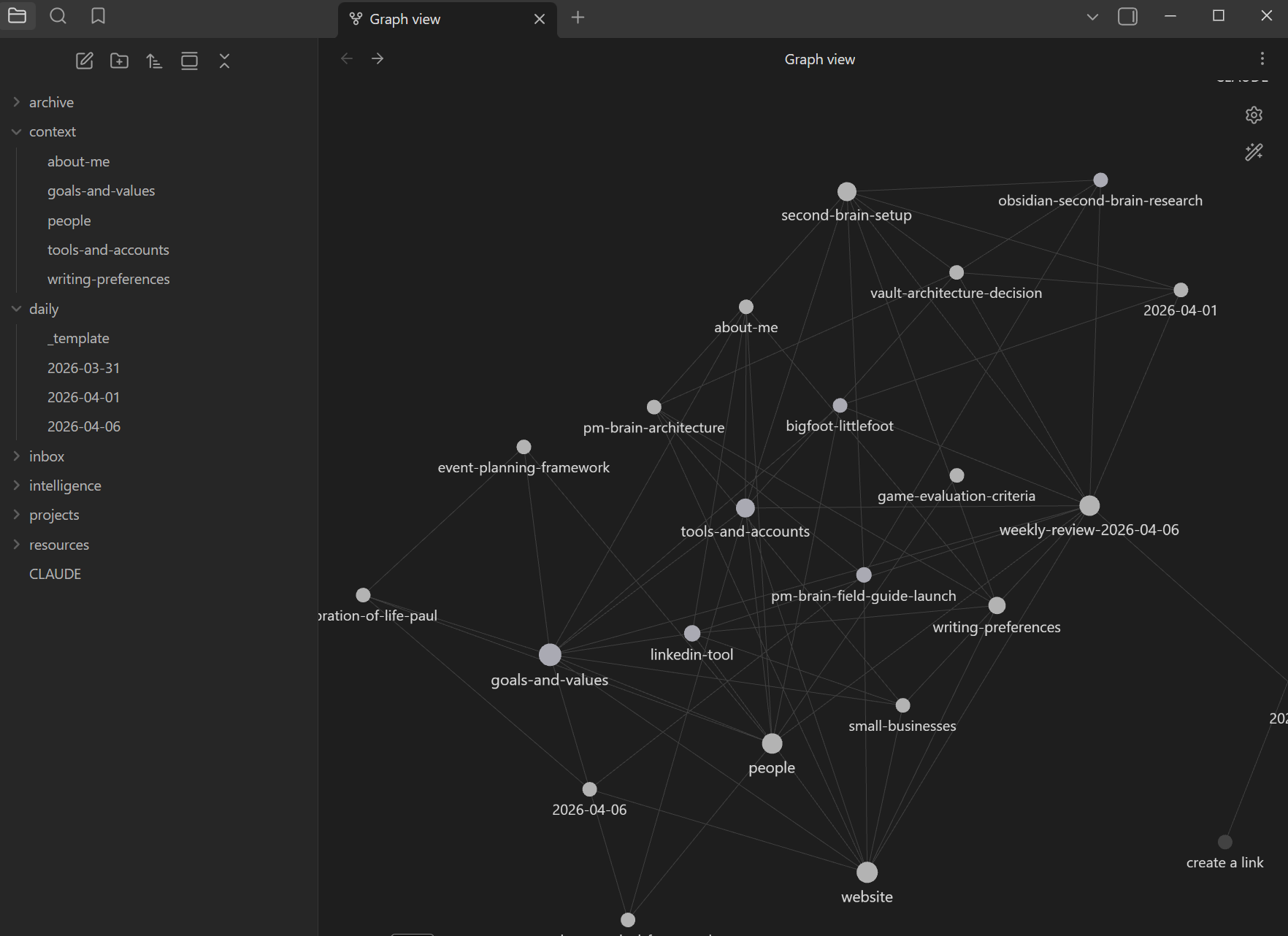
The folder structure does the organizing. Obsidian's graph view sits on top and shows me visually how the notes connect to each other. The graph is the map. The folders are the territory. The two memory files are how the AI stays oriented inside both.
Where It Still Creaks
A few things this doesn't solve yet, in case you're thinking of building your own version.
Sharing across the team
Confluence pages attached to epics work, but they're a snapshot. The living version still lives in my workspace. I haven't found a clean way to share the brain itself, only its outputs.
Slicing to a winnable objective
The architecture helps me see the whole problem, which is great for strategy and brutal for scoping. Cutting a five-month vision into a two-week win is still mostly a human judgment call.
Technical feasibility gut-checks
I still lean on architects and senior developers to tell me if a direction is even possible. Pointing the system at GitHub repos for a faster gut check is on the list. Not done yet.
The connective tissue between all four layers is a set of six skills I built to automate the workflow I used to do by hand. Those shipped. Three of them are the Research, Plan, Implement trio, rebuilt in July around the idea that the handoff document is the real product of each phase. All six, plus the folder system underneath, are written up as Cowork OS.
Honest update since April, because this page originally promised a bigger version of this section. I am much less excited than I was about packaging every pattern into a skill. I use these six constantly and I would build them again. I would not spend another weekend building the seventh when a well-written prompt does the same job. The four layers were the durable part. The scaffolding around them was mostly me enjoying the building.
Who This Is For
A product manager at a 50 to 300 person SaaS company who's drowning in customer signal and tired of making decisions on vibes. Also a no-code builder or solo founder who needs to think clearly about what to build next without a team to do the synthesis for them. If your work is context-heavy and your short-term memory is finite, this is for you.
3. Skills
Skills aren't settings. They're coworkers you trained.
If you don't know where to start, start here: download a plugin. The productivity plugin is a great first one, or whatever plugin matches the role you're in. You don't need to build anything from scratch.
Here's what happens next. You run a skill, and the output isn't quite right. Instead of starting over or tweaking your prompt, you just talk to it. Literally in that moment:
"Hey, I don't really like this part. Can you make it more concise?"
"Next time, skip the bullet points. I prefer prose."
"Always include the Jira project key when you generate epics."
That feedback accumulates. The skill slowly becomes yours. Over time, your AI starts to feel like your AI. Not a generic assistant. Yours.
And when you're ready to go further, you can take any skill and say: "I like what this does, but I want to create my own version customized to me. Here's my workflow, here are the tasks I do, here's what's special about my job. Help me build it." Walk through it step by step, and you can automate a piece of your workflow that used to eat hours.
What I've Built
I have a six-skill pipeline that takes raw customer signal (Gong calls, Slack threads, meeting notes) and turns it into stakeholder-ready output. Problem synthesis, theme mapping, RICE scoring, value slicing, epic generation, and deck creation. Chained together.
You don't need a six-skill pipeline to get value. Start with one plugin. Use it. Talk to it. Make it better. Then pick the next thing.
4. Projects
Two sentences. That's all you need to understand this.
Claude Projects aren't for organizing files. They're for injecting persistent context so every conversation starts informed. The folder structure you build around the project matters more than the project itself. The project is the anchor.
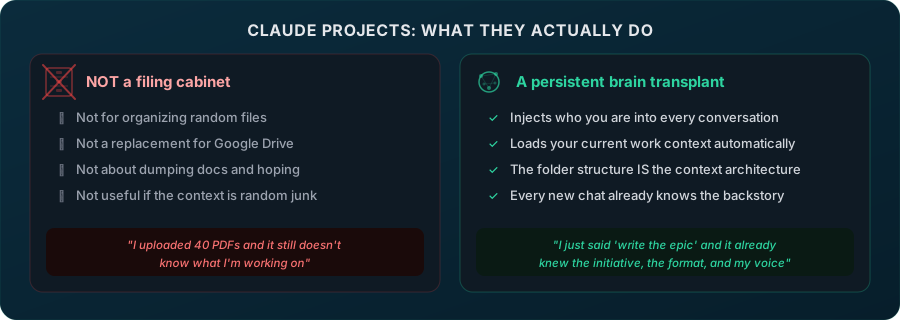
If you read the Folder System section above, you already get the principle. Projects are the mechanism that makes it work. Drop your instruction files in, set the context, and every new chat starts with everything the AI needs to be useful right away.
5. Go Play With It
Structure is in place. Now use it. Don't try to optimize. Just go.
Give it a real task
Not "write me a haiku." Something you actually need to do. Summarize a Gong call. Draft a Jira epic. Prep for your 1:1. Research a competitor. The more real the task, the faster you'll see the value.
Connect your tools
Slack, Jira, Confluence, Gong, Notion, Gmail, Google Calendar, Google Drive, Lucid. These are the connectors I use daily. The AI can't help with real work if it can't see real data. "Pull insights from my last three Gong calls" only works if Gong is connected. This is where it stops being a chatbot and starts being useful. One correction since April: this list used to say Granola instead of Notion. Granola is still the better product, it is just not approved at my company. Use whatever your org actually allows.
Set up your preferences
Tell it how you work. What tools you use. How you like things formatted. What annoys you. This takes 10 minutes and pays off in every conversation after.
Let the memory build
The more you use it, the more it learns about you. Preferences, patterns, context. Play first, optimize second. It compounds.
If You're Stuck
Talk to Claude.
Just describe what you're trying to do in plain English. "I need to prep for my 1:1 and I don't know where to start." It will walk you through it. You can also use the Ask General Questions feature in the Claude sidebar for quick, no-setup-needed conversations when you don't want to work inside a project.
Build one shared team project.
The highest-leverage thing my team did was stand up a single shared project that acts as a living knowledge base for our platform API, trained on the real spec plus all the undocumented gotchas. One place to ask instead of five people to interrupt. If your team has one system everybody has questions about, that is your first shared project.
If Claude can't help, ask Gemini.
Different models are better at different things. Gemini is solid for quick research and Google-ecosystem tasks. Use both.
If neither can help, ask in public.
Post what you tried and where you got stuck in whatever channel your team uses. Somebody has probably hit the same wall, and the ones who haven't will hit it next week.
What This Actually Changed
The honest measure of a system like this is not how it feels to use. It's what happens to the work. Three things changed for me, and only one of them is the one I expected.
Research that used to take half a day takes thirty minutes. Epics come out structured correctly the first time. My standup is drafted before I open Slack. That's the expected part, and it's real, and it is the least interesting thing on this page.
The second change is that I stopped arguing about opinions. When you walk into a room with a book of signals, a synthesis doc sitting on top of them, and a one-page brief tied to the company's actual objectives, the conversation is about evidence. That is a different job than the one I had two years ago, and it is a much better one.
The third change is the one I did not see coming, and it's the reason this page still matters. Go back and read the developer story above. He took a signals doc off an epic, loaded it into his own session, and ate three weeks of scoped work in two days. I published that in April as a win, and it is one. It is also the problem statement.
If a developer can finish a month of well-scoped work in three days, the constraint is no longer engineering throughput. It is the person deciding what to build. That's me. That's the actual bottleneck now, and no amount of tooling fixes it, because what's scarce is judgment about what deserves to exist, and judgment does not run on a schedule.
Which is the whole argument for building something like this. Not because the automation is impressive. Because the automation buys back the hours you need for the part that cannot be automated. If you're drowning in "why is this broken," you never get to "what should we build."
I wrote more about that curve, including the part where I overbuilt all of this and had to cut it back, in Peak AI Frenzy.
Faster than making a PowerPoint. And it looks cooler too. If something here is wrong, outdated, or missing, let me know.